How to Track Goals and Conversions Without Google Analytics
 Jonathan Whitaker
·
·
8 min read
Jonathan Whitaker
·
·
8 min read

You don’t need Google Analytics to track conversions. In fact, most privacy-first tools make it simpler. Here’s how to set up goal tracking in Plausible, Umami, and Matomo — with actual examples.
I’ve configured conversion tracking across all three platforms for clients ranging from SaaS startups to e-commerce stores. The setup is faster than you’d expect, and the data is cleaner because these tools aren’t trying to do everything at once.
This guide walks you through the practical steps for each tool, including code you can copy and adapt.
What Counts as a Conversion?
Before you touch any tracking code, define what a conversion actually means for your site. This sounds obvious, but I’ve seen teams track dozens of “goals” without knowing which ones matter.
A conversion is any action that moves a visitor closer to your business objective. Common examples:
- Macro conversions: Purchases, signups, subscription starts
- Micro conversions: Newsletter signups, PDF downloads, contact form submissions
- Engagement signals: Visiting a pricing page, watching a demo video, adding an item to cart
Start with 3-5 goals maximum. You can always add more later, but tracking everything from day one creates noise. If you’re working on improving these numbers, check out our conversion rate optimisation best practices for actionable techniques.
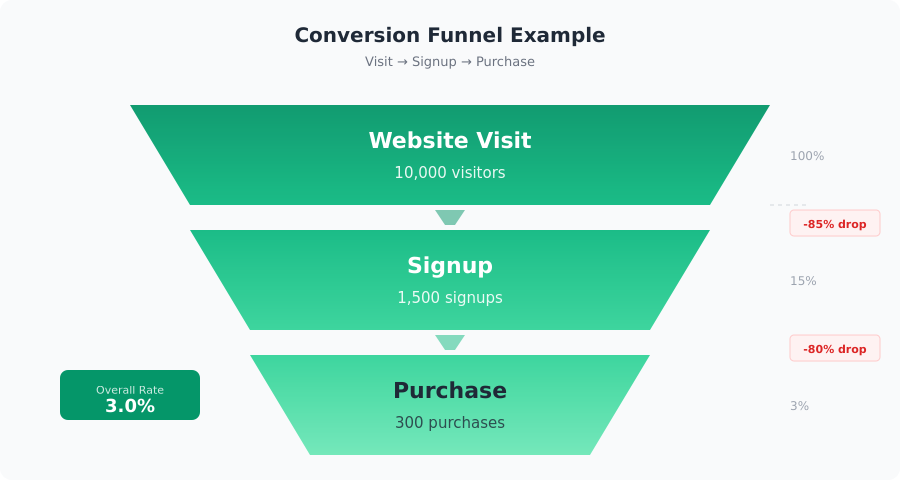
Conversion Tracking in Plausible
Plausible keeps conversion tracking deliberately simple. There are two types of goals: page-based and custom events.
Page-Based Goals
Page-based goals trigger when a visitor lands on a specific URL. This works well for thank-you pages, confirmation screens, or any destination that signals a completed action.
To set one up, go to your site settings in Plausible, click Goals, then Add Goal. Choose “Pageview” and enter the path:
/thank-you
/signup/complete
/order/confirmation
You can use wildcards too. For example, /blog/* would track visits to any blog post as a goal. This is useful if you want to measure how many visitors engage with your content.
The thing most guides don’t tell you: page-based goals only work if your conversion flow ends on a distinct URL. Single-page apps or inline confirmation messages won’t trigger these. For those, you need custom events.
Custom Event Goals
Custom events let you track specific interactions — button clicks, form submissions, video plays. You fire them from your site’s JavaScript.
First, add the goal name in Plausible’s dashboard under Goals > Add Goal > Custom Event. Then add this to your site:
<script>
// Track a signup button click
document.getElementById('signup-btn').addEventListener('click', function() {
  plausible('Signup');
});

// Track with custom properties
plausible('Purchase', {
  props: {
    plan: 'Pro',
    value: '49'
  }
});
</script>
Custom properties let you segment conversions later. You might track which pricing plan was selected or which CTA drove the conversion.
For full setup details, see Plausible’s goal conversion documentation, or my walkthrough of how to configure goals in Plausible, which also covers the CSS-class method that needs no JavaScript.
Conversion Tracking in Umami
Umami handles conversion tracking through its built-in event tracking system. If you’re self-hosting Umami (which most users do), you have full control over the data.
Using the Track Function
Umami provides a umami.track() function that works similarly to Plausible’s approach. Here’s how to implement it:
<script>
// Basic event tracking
document.querySelector('.cta-button').addEventListener('click', function() {
  umami.track('cta-click');
});

// Track with event data
umami.track('purchase', {
  product: 'Annual Plan',
  revenue: 199,
  currency: 'USD'
});

// Track form submissions
document.getElementById('contact-form').addEventListener('submit', function() {
  umami.track('form-submit', {
    form: 'contact',
    source: window.location.pathname
  });
});
</script>
Umami also supports data attributes for simple click tracking without writing JavaScript:
<button data-umami-event="signup-click"
        data-umami-event-plan="starter">
  Start Free Trial
</button>
This is one of my favourite features. You can hand this to a developer who doesn’t know analytics, and they can instrument the whole site with data attributes in an afternoon.
Events show up in Umami’s dashboard under the Events tab. You can filter by date range, compare periods, and see which events trend up or down. For the full API, check Umami’s event tracking documentation.
Conversion Tracking in Matomo
Matomo offers the most feature-rich conversion tracking of the three. It has dedicated goals, funnels (in the premium version), and e-commerce tracking built in.
Goals and Funnels
In Matomo, you create goals through the admin panel: Goals > Manage Goals > Add a new Goal. You can trigger goals based on:
- URL visits (like Plausible’s page-based goals)
- Page title matches
- External link clicks
- File downloads
- Custom events
For event-based goals, you first need to fire a tracking call:
<script>
// Track a custom event in Matomo
var _paq = window._paq = window._paq || [];

// trackEvent(category, action, name, value)
_paq.push(['trackEvent', 'Signup', 'Complete', 'Pro Plan', 49]);

// Track a goal directly by ID
_paq.push(['trackGoal', 1]); // Goal ID 1

// Track a goal with revenue
_paq.push(['trackGoal', 1, 99.00]);
</script>
Then, create a goal in Matomo that matches the event category and action. Matomo will connect the dots.
If you’re on Matomo Cloud or have the Funnels plugin, you can define multi-step funnels. For example: Visit pricing page, then click “Start Trial,” then complete registration. This is where Matomo pulls ahead of the other two tools — you can see exactly where users drop off. Understanding how users move through these stages ties directly into marketing attribution and knowing which channels drive completed conversions.
Full details in Matomo’s goal tracking documentation.
E-Commerce Tracking Without GA
If you’re running an online store, you need more than basic event tracking. You need revenue data, product performance, and cart metrics. Here’s how each tool handles it:
Plausible uses custom event properties with revenue values. It’s lightweight but requires you to structure your own reporting. You send revenue as a property on your purchase event, and Plausible aggregates it.
Umami tracks e-commerce events the same way it tracks any event — through umami.track() with structured data. You’ll build the revenue dashboards yourself or export the data.
Matomo has dedicated e-commerce tracking that mirrors what you’d expect from a full analytics platform:
<script>
// Matomo e-commerce tracking
var _paq = window._paq = window._paq || [];

// Track a product view
_paq.push(['setEcommerceView',
  'SKU-1234',           // Product SKU
  'Running Shoes',      // Product name
  'Footwear',           // Category
  89.99                 // Price
]);
_paq.push(['trackPageView']);

// Track an order
_paq.push(['addEcommerceItem',
  'SKU-1234', 'Running Shoes', 'Footwear', 89.99, 1
]);
_paq.push(['trackEcommerceOrder',
  'ORDER-5678',  // Order ID
  89.99,         // Grand total
  79.99,         // Sub total
  6.40,          // Tax
  5.00,          // Shipping
  false          // Discount
]);
</script>
In my experience, if e-commerce tracking is your primary need, Matomo is the strongest choice among privacy-first tools. Plausible and Umami can do it, but you’ll spend more time building custom reporting. For a broader look at how these tools stack up, see our privacy-first analytics tools roundup.
Common Mistakes
I’ve made most of these mistakes myself, so take this list seriously:
- Tracking too many goals at once. Start with 3-5. You can always add more once your tracking is validated.
- Not testing in development. Fire every event in a staging environment first. Check that your analytics dashboard actually receives the data before going live.
- Forgetting to exclude internal traffic. Your own visits will inflate conversion numbers. All three tools offer IP or hostname filtering.
- Using vague event names. “Click” tells you nothing. Use descriptive names like “pricing-cta-click” or “demo-request-submit.”
- Ignoring micro conversions. Not every conversion is a sale. Newsletter signups, content downloads, and pricing page visits tell you where users are in their journey. This ties into cohort analysis — understanding how groups of users behave over time.
- Not setting revenue values. If a conversion has monetary value, track it. Even estimated values help you calculate ROI on traffic sources.
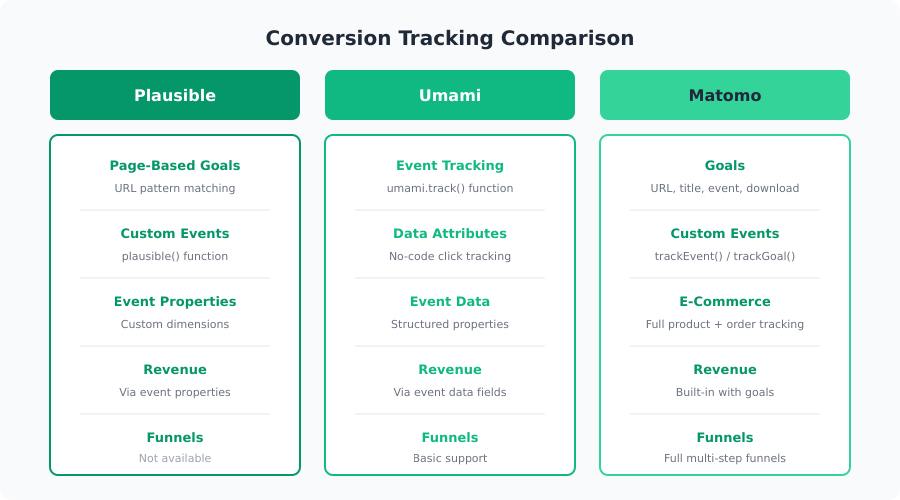
Which Tool Handles It Best?
Here’s an honest comparison based on what I’ve seen across client projects:
| Feature | Plausible | Umami | Matomo |
|---|---|---|---|
| Setup complexity | Very easy | Easy | Moderate |
| Page-based goals | Yes | Via events | Yes |
| Custom events | Yes | Yes | Yes |
| Event properties | Yes | Yes | Yes |
| Funnel tracking | No | Basic | Yes (plugin) |
| E-commerce tracking | Basic | Basic | Full |
| Revenue tracking | Via properties | Via event data | Built-in |
| Self-hosting option | Yes | Yes | Yes |
| Privacy compliance | Cookieless | Cookieless | Configurable |
Choose Plausible if you want the fastest setup and your conversion tracking needs are straightforward. It’s ideal for content sites, SaaS landing pages, and small teams that don’t want to manage infrastructure.
Choose Umami if you self-host and want flexibility. The data attribute approach makes it easy to instrument sites without heavy JavaScript. It’s a great fit for developers who want control without complexity.
Choose Matomo if you need full-featured analytics — funnels, e-commerce, segmentation, and detailed reporting. It’s the closest to a traditional analytics platform while still offering strong privacy controls.
What I’ve seen work best is picking one tool and going deep rather than spreading across multiple platforms. Whichever you choose, the conversion tracking setup takes an afternoon, not a week. Start with your top 3 goals, validate the data, and expand from there.
Jonathan Whitaker
Marketing analyst and CXL-certified optimizer with 6+ years of experience in web analytics, conversion optimization, and privacy-first data strategy. Former analytics lead for e-commerce and SaaS companies across North America, now focused on helping businesses make better decisions with less data. Specializes in Plausible, Umami, Matomo, and cookieless analytics. Based in Vancouver, BC.