
Every privacy-first analytics tool claims to replace Google Analytics. Most can — but they do it differently. After testing all of these on real sites, here’s what I’d actually recommend in 2026.
The privacy landscape has shifted. GDPR enforcement is tighter, browsers block third-party cookies by default, and users are more aware of tracking than ever. If you’re still relying on a tool that requires cookie consent banners, you’re already losing data. I’ve written about how cookie consent banners break your analytics — the short version is that opt-in rates keep dropping.
These five privacy-first analytics tools take different approaches to the same problem: giving you useful data without compromising your visitors’ privacy. Some are dead simple. Others give you more power than you’ll know what to do with. Here’s how they compare.
How I Evaluated These Tools
This is not a rewrite of feature pages. Every claim below is checked against the vendor’s own documentation and interface. Here’s what I looked at:
- Privacy compliance: Does it work without cookies? Is it GDPR-compliant out of the box? Do you need a consent banner?
- Data accuracy: How close are the numbers to reality? Does it handle ad blockers, bot traffic, and single-page apps?
- Ease of setup: Can a marketer install it, or do you need a developer? How long from sign-up to first data?
- Dashboard usability: Can you answer basic questions quickly? How many clicks to get to what matters?
- Pricing and value: What do you actually pay at different traffic levels? Are there hidden costs?
I also considered how well each tool supports data minimisation — the principle of collecting only what you need. The best privacy-first tools make this the default, not an afterthought.
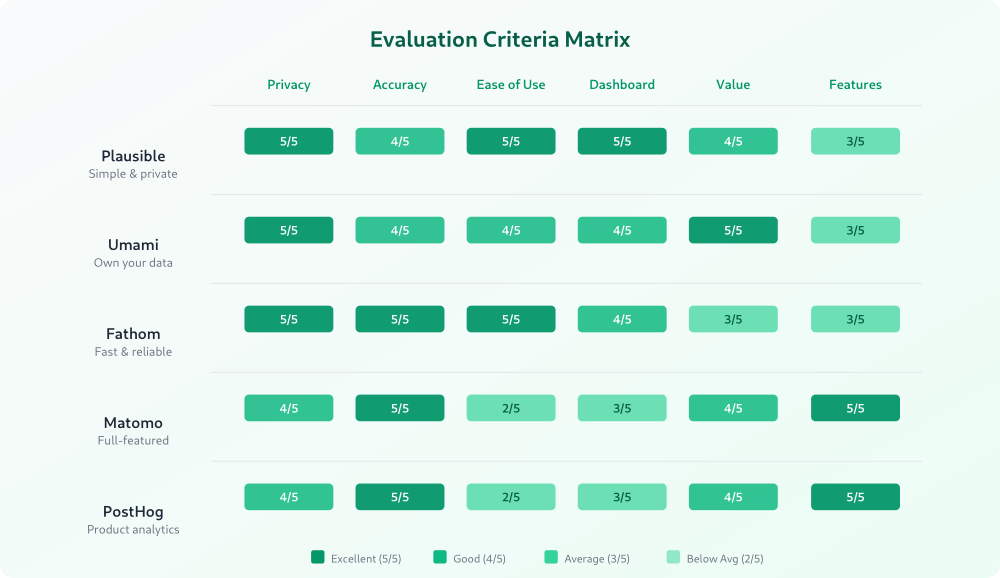
Quick Comparison
| Tool | Starting Price | Self-Hosted Option | GDPR Without Consent | Learning Curve | Best For |
|---|---|---|---|---|---|
| Plausible | $9/mo | Yes (community) | Yes | Low | Simplicity |
| Umami | Free (self-hosted) | Yes | Yes | Low-Medium | Self-hosting |
| Fathom | $15/mo | No | Yes | Low | Speed & reliability |
| Matomo | Free (self-hosted) | Yes | Configurable | Medium-High | Full control |
| PostHog | Free tier available | Yes | Configurable | High | Product teams |
| Statable | $9/mo | No (cloud only) | Yes | Low | Running several sites |
1. Plausible Analytics — Best for Simplicity
Plausible is what happens when you strip analytics down to what actually matters. The entire dashboard fits on one page. No training required. You add a single script tag, and you’re collecting data within minutes. If you want the full walkthrough, I’ve written up setting up Plausible step by step, including the WordPress plugin and the ad-blocker proxy.
I’ve used Plausible on client projects where the marketing team had two people and zero patience for complex tools. They loved it. The dashboard answers the questions most teams actually ask: where’s my traffic coming from, which pages are popular, and are my campaigns working?
Standout Features
- One-page dashboard: Everything visible without clicking through menus
- Lightweight script: Under 1KB — won’t affect your page speed
- Goal and event tracking: Custom events without writing code (using CSS classes)
- Email reports: Weekly or monthly summaries sent automatically
- Public dashboards: Share stats openly if you want transparency
Pricing
Starts at $9/month for up to 10K monthly pageviews. Scales based on traffic — 100K pageviews runs about $19/month, and 1M is $69/month. There’s also a community edition you can self-host for free, though it requires more technical setup.
Pros
- Genuinely easy to use — no analytics background needed
- No cookies, no consent banner required
- EU-owned and hosted (data stays in the EU)
- Open source and transparent
Cons
- Limited segmentation and filtering compared to full-featured tools
- No funnel analysis or user flow visualization
- Custom event tracking is basic — no event properties beyond simple counts
- No raw data export for advanced analysis
Who It’s Best For
Content sites, blogs, small businesses, and anyone who wants clean traffic data without complexity. If you’ve ever felt overwhelmed by analytics dashboards, Plausible is the antidote.
2. Umami — Best for Self-Hosting
Umami is the self-hosting champion. It’s open source, runs on your own server, and gives you complete ownership of your data. What surprised me was how polished the UI is for a free, open-source project.
I ran Umami on a DigitalOcean droplet for about eight months. Setup took maybe 30 minutes with Docker, and it handled 500K+ pageviews per month without breaking a sweat. The cost? About $6/month for the server.
Standout Features
- Full data ownership: Everything lives on your server, in your database
- Multi-site support: Track unlimited websites from one installation
- Real-time dashboard: See visitors as they browse
- Custom events: Track button clicks, form submissions, and other interactions
- API access: Pull data programmatically for custom reporting
Pricing
Free and open source for self-hosting. Umami Cloud (their managed service) starts with a free hobby tier for up to 10K events/month. Paid plans start at $9/month for 100K events.
Pros
- Completely free to self-host
- No cookies, GDPR-compliant by design
- Clean, modern interface
- Active development community
- Supports MySQL and PostgreSQL
Cons
- Self-hosting requires server management skills
- No built-in alerting or automated reports
- Documentation can be sparse for edge cases
- Fewer integrations than commercial tools
Who It’s Best For
Developers and technical teams who want full data ownership without paying for a SaaS subscription. Also great for agencies managing multiple client sites — one installation handles them all.
3. Fathom Analytics — Best for Speed
Fathom is the tool I recommend when someone says “I just want it to work.” It’s fast, reliable, and has the best uptime of any analytics tool I’ve tested. The dashboard loads in under a second, every time.
What sets Fathom apart is their approach to compliance. They’ve built what they call “intelligent routing” — EU visitor data is processed in the EU, and they’ve invested heavily in legal opinions and compliance documentation. If you’re worried about data transfers, Fathom has done the homework.
Standout Features
- Intelligent routing: Automatic EU data isolation for GDPR compliance
- Uptime tracking: Get notified when your site goes down (built into the analytics tool)
- Event tracking: Simple event completions with monetary values
- Email reports: Customizable weekly, monthly, or quarterly summaries
- Bypass ad blockers: Custom domain option to improve data accuracy
Pricing
Starts at $15/month for up to 100K pageviews. 1M pageviews runs $35/month. More expensive than Plausible at lower tiers, but competitive at higher volumes. No self-hosted option — it’s cloud-only.
Pros
- Exceptionally fast and reliable
- Strong compliance documentation
- Built-in uptime monitoring
- Custom domain for improved accuracy
- Founded by privacy advocates with a track record
Cons
- No self-hosted option
- More expensive than alternatives at low traffic
- Limited customization — what you see is what you get
- No funnel analysis or cohort tracking
Who It’s Best For
Businesses that want a premium, “set it and forget it” analytics solution. Particularly strong for companies with EU customers who need bulletproof GDPR compliance without managing infrastructure.
4. Matomo — Best for Full Control
Matomo is the heavyweight. It’s the closest thing to a full Google Analytics replacement in the privacy-first space — with heatmaps, session recordings, A/B testing, and more. But that power comes with complexity.
I’ve set up Matomo for e-commerce clients who needed detailed funnel analysis and custom dimensions. It delivered. But I’ve also seen teams drown in its interface because they configured everything and understood nothing. Matomo rewards investment — you need to learn it properly.
Standout Features
- Comprehensive reporting: Page analytics, e-commerce tracking, custom dimensions, and calculated metrics
- Heatmaps and session recordings: See how visitors interact with your pages (paid add-on)
- Tag manager: Built-in tag management — no need for a separate tool
- Roll-up reporting: Aggregate data across multiple sites
- GDPR tools: Built-in consent management, data anonymization, and right-to-delete support
Pricing
The self-hosted (On-Premise) version is free. Matomo Cloud starts at $23/month for 50K hits. Premium features like heatmaps, A/B testing, and funnels are paid plugins — budget an extra $200-600/year depending on what you need.
Pros
- Most feature-rich privacy-first analytics tool available
- 100% data ownership when self-hosted
- Mature platform with years of development
- Extensive plugin ecosystem
- Import historical data from other platforms
Cons
- Steep learning curve — not intuitive for beginners
- Self-hosted version requires significant server resources at scale
- Premium plugins add up quickly
- Interface feels dated compared to newer tools
- GDPR compliance requires configuration — not automatic like Plausible or Fathom
Who It’s Best For
Organizations that need detailed analytics with full data ownership and are willing to invest time in setup and training. E-commerce sites, enterprises, and teams migrating from Google Analytics who don’t want to lose functionality.
5. PostHog — Best for Product Teams
PostHog isn’t strictly a web analytics tool — it’s a product analytics platform that includes web analytics. I’m including it because if you’re building a SaaS or web application, it’s the most powerful privacy-respecting option available.
I started using PostHog on a client’s SaaS product last year. The combination of analytics, feature flags, and session replay in one platform eliminated three separate tools. The learning curve is real, but the payoff is significant for product-focused teams.
Standout Features
- Product analytics: Funnels, retention, user paths, and cohort analysis
- Feature flags: Roll out features to specific user segments
- Session replay: Watch real user sessions to debug issues
- Experimentation: A/B testing built into the platform
- Data warehouse: Query your raw data with SQL
Pricing
Generous free tier: 1M events/month for analytics, 5K session replays, and 1M feature flag requests. Paid usage is $0.00031 per event beyond that. Self-hosting is available but officially “unsupported” — they push you toward their cloud.
Pros
- All-in-one product analytics suite
- Generous free tier for startups
- SQL access to raw data
- Active open-source community
- Self-hostable (with caveats)
Cons
- Overkill for simple content sites
- Complex setup and steep learning curve
- Self-hosting documentation is inconsistent
- GDPR compliance requires careful configuration
- Can get expensive at scale if you’re not careful with event volumes
Who It’s Best For
Product teams building web applications or SaaS products who want analytics, experimentation, and feature management in one tool. Not ideal for blogs or content sites — use Plausible or Fathom instead.
6. Statable — Best for Running Several Sites
If you look after more than one website, it is worth checking how a tool counts them: some plans price on traffic and on the number of sites at the same time, others include a fixed allowance. A hosted option like Statable keeps it to one number — every paid plan includes the full feature set and an unlimited number of sites, so the price moves only with traffic.
Standout Features
- One-axis pricing: all features and unlimited websites on every paid plan
- Cookieless by design: no cookies, no persistent identifiers, raw IP never stored, visitor ID changes daily
- GA4 history import: your Google Analytics history comes across in a few clicks
- Events, goals and funnels without a separate plan tier
- Embeddable widgets and public shareable dashboards
Pricing
From $9/month for 10,000 pageviews, $19 at 100K. Free for .edu domains and GitHub/GitLab Pages projects; everyone else gets a 30-day trial.
Pros
- No per-site upsell — the cheapest paid plan is the full product
- Data processed and stored in the European Union
- Everything on one screen, and every row filters the whole dashboard
Cons
- Closed source and cloud-only — no self-hosting
- Newer than Plausible or Matomo, so a shorter track record
- The visitor ID rotates daily, so it cannot follow one person across days
Who It’s Best For
Freelancers, agencies and indie makers with a handful of projects, where the site count runs out before the traffic limit does.
Which One Should You Pick?
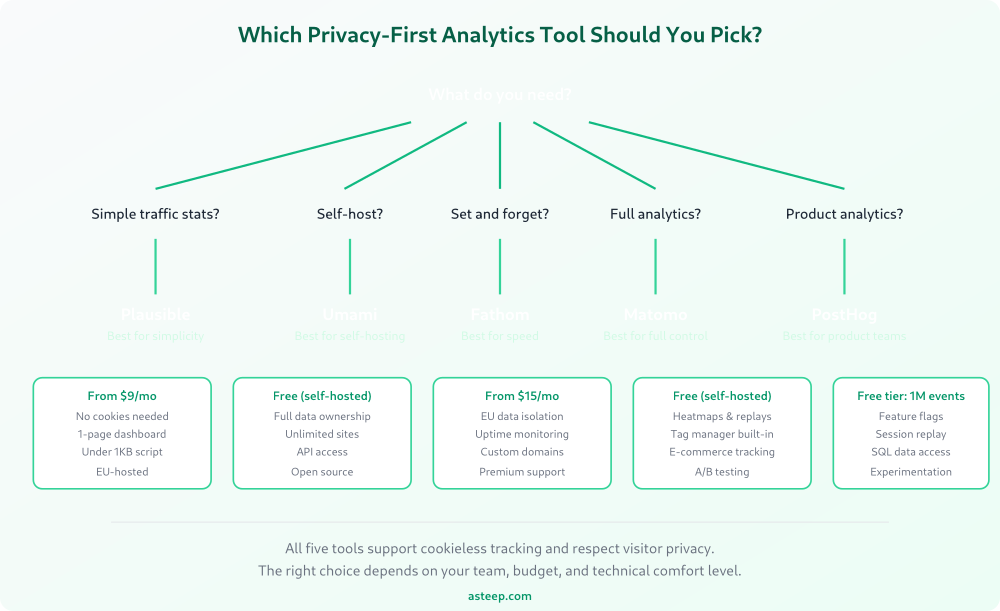
After using all six of these tools in production, here’s my honest take:
Pick Plausible if you want clean, simple analytics that just works. It’s the tool I recommend most often because most sites don’t need more than what it offers. If you’re tracking a blog, marketing site, or small business website, start here.
Pick Umami if you want to self-host and own everything. The $0 price tag is real, and the UI is better than most paid tools. You just need to be comfortable managing a server.
Pick Fathom if reliability and compliance are your top priorities. It costs a bit more, but you’re paying for peace of mind. The uptime monitoring is a nice bonus.
Pick Matomo if you need advanced analytics — funnels, custom dimensions, e-commerce tracking — and you want to own your data. Budget for the learning curve and potentially some premium plugins.
Pick PostHog if you’re a product team building software. It replaces multiple tools, and the free tier is generous enough to get started without a budget conversation.
Pick Statable if you want the site count out of the pricing conversation entirely. Its cheapest paid plan carries every feature and as many websites as you like, so the only number that moves your bill is traffic.
The best analytics tool is the one your team will actually use. I’ve seen expensive, feature-rich setups ignored because nobody understood the dashboard. And I’ve seen simple tools like Plausible drive real decisions because the data was clear and accessible.
Whatever you choose, the fact that you’re considering privacy-first options means you’re already ahead. Your visitors’ data deserves better than being shipped to ad networks, and these tools prove you don’t have to sacrifice insights to respect privacy.
For more context on what metrics actually matter once you’ve picked a tool, check out my guide on understanding website traffic metrics.

Jonathan Whitaker
Marketing analyst and CXL-certified optimizer with 6+ years of experience in web analytics, conversion optimization, and privacy-first data strategy. Former analytics lead for e-commerce and SaaS companies across North America, now focused on helping businesses make better decisions with less data. Specializes in Plausible, Umami, Matomo, and cookieless analytics. Based in Vancouver, BC.