Why Cookie Consent Banners Break Your Analytics
 Jonathan Whitaker
·
·
6 min read
Jonathan Whitaker
·
·
6 min read

Most websites now show a cookie consent banner. That’s not news. What is news: those banners are silently destroying your analytics data, and most teams don’t even realize it.
If you rely on cookie-based tracking, you’re likely seeing only a fraction of your actual traffic. The rest just disappears. No error message, no warning — just a growing gap between reality and your reports.
The Consent Problem in Numbers
Here’s the uncomfortable truth. Across Europe, where GDPR cookie rules are strictly enforced, consent rates for analytics cookies typically land between 30% and 50%. In some industries, it’s even lower.
That means if 1,000 people visit your site, your analytics platform might only track 300 to 500 of them. The rest clicked “reject” or simply closed the banner — and your tracking script never fired.
I’ve seen this happen with clients who couldn’t understand why their paid campaigns looked like they were underperforming. The traffic was there. The conversions were happening. But the data said otherwise, because more than half of visitors never consented to cookies.
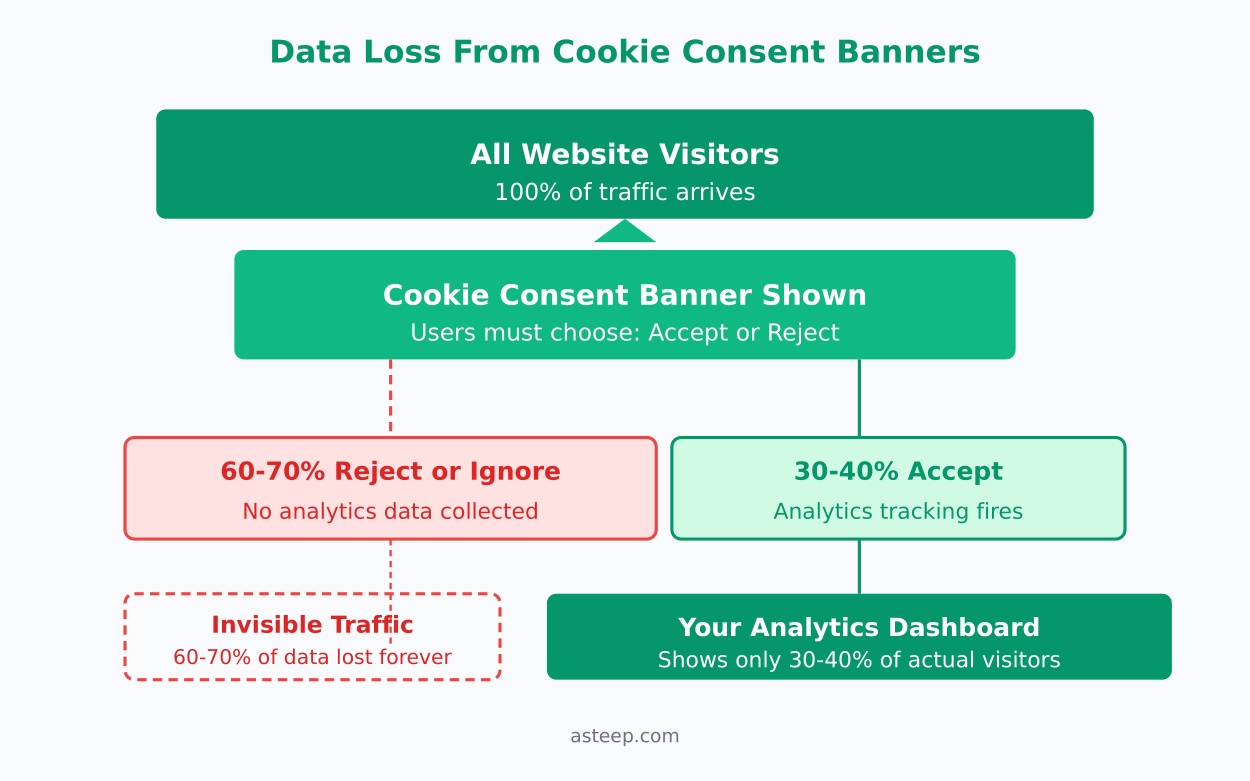
The problem gets worse every year. Browser privacy features are getting stricter. Safari’s Intelligent Tracking Prevention, Firefox’s Enhanced Tracking Protection, and Brave’s built-in blocking all reduce cookie lifespans or block them outright. Even Chrome is tightening third-party cookie restrictions.
How Consent Banners Affect Your Data
Cookie consent doesn’t just reduce your numbers — it skews them. And that’s the part most people miss.
Think about who actually clicks “accept all” on a consent banner. It tends to be people who are less privacy-conscious, less technical, and often repeat visitors who’ve already accepted before. The people who reject cookies? They’re often first-time visitors, tech-savvy users, and people browsing on privacy-focused browsers.
This creates a systematic bias in your data. You end up over-representing one type of visitor and under-representing another. Your bounce rates, session durations, and conversion funnels all reflect this skewed sample — not your actual audience.
The thing most guides don’t tell you is that consent banners also mess with attribution. If a visitor comes from an email campaign but rejects cookies, that visit doesn’t show up in your campaign report. Your email marketing looks worse than it actually is. Meanwhile, direct traffic gets inflated because returning visitors who previously rejected cookies show up as new, unattributed sessions.
What You’re Actually Missing
Let’s break down what disappears when a visitor declines cookies:
- Session tracking — you can’t connect pageviews into a coherent journey
- Returning visitor identification — every visit looks like a new user
- Conversion attribution — you lose the trail from first touch to purchase
- Campaign performance data — traffic sources become invisible
- A/B test results — your sample size shrinks, making tests unreliable
In my experience working with small teams, this data loss compounds over time. A 40% consent rate doesn’t just mean 40% less data — it means your trends, comparisons, and forecasts are all built on an incomplete and biased foundation. You can read more about why your website traffic numbers might be wrong beyond just consent issues.
The real cost isn’t just missing numbers. It’s making decisions based on data that doesn’t represent your actual audience. I’ve watched teams cut budget from channels that were actually performing well, simply because the consent-filtered data made them look bad.
Three Ways to Fix This
You don’t have to accept broken analytics as the cost of privacy compliance. There are practical alternatives that respect user privacy while giving you complete, accurate data.
Option 1: Cookieless Analytics
The most straightforward fix is to stop using cookies for analytics entirely. Tools like Plausible, Fathom, and Umami don’t set any cookies. They use privacy-friendly techniques to count visitors without storing personal data on the user’s device.
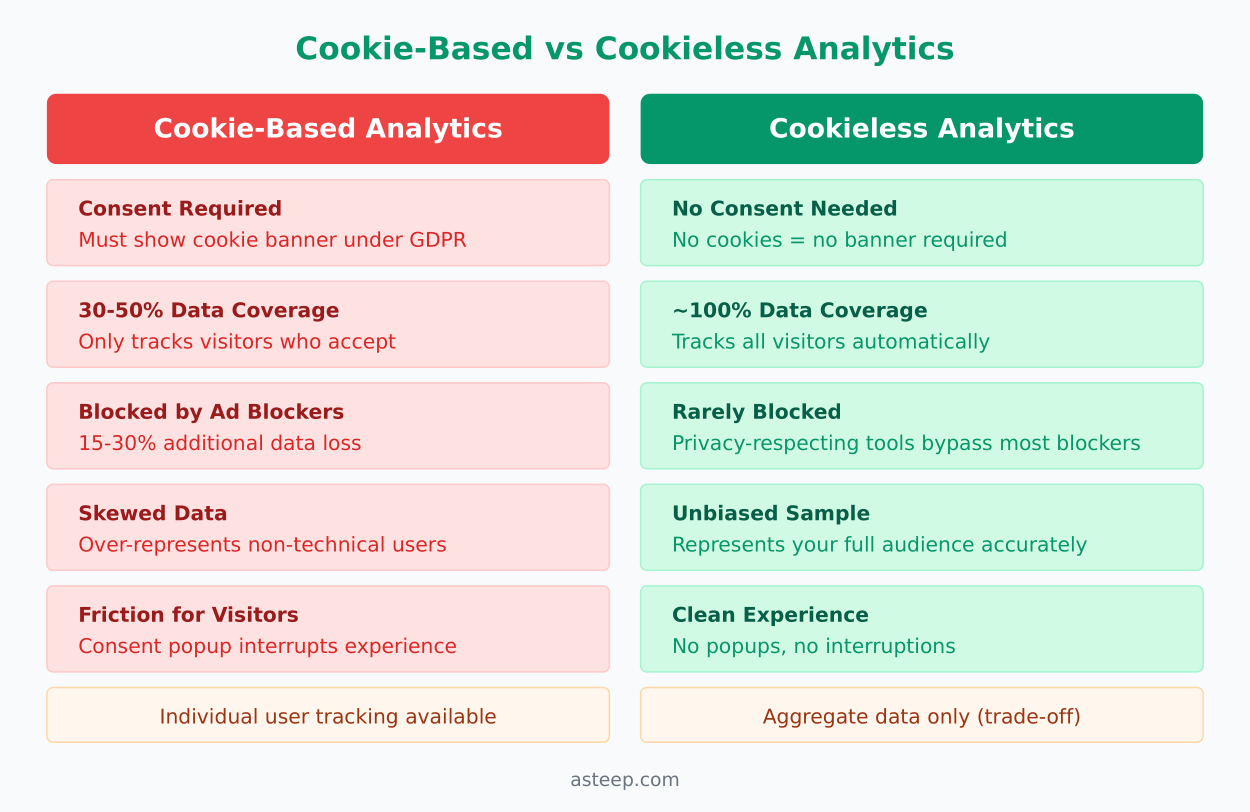
Because there are no cookies involved, there’s nothing to consent to. Your analytics script runs for every single visitor, giving you 100% data coverage instead of 30-50%. Installing one is a short job, too; I’ve documented the whole Plausible install, from snippet to goals, if you want to see what that looks like in practice.
What I’ve seen work best is making this switch for general website analytics. You get accurate traffic numbers, referral sources, and page performance — without any consent friction. The trade-off is that you lose individual user tracking, but for most marketing teams, aggregate data is what actually drives decisions.
Option 2: Server-Side Tracking
If you need more detailed tracking than cookieless tools provide, server-side analytics is worth considering. Instead of relying on client-side JavaScript that gets blocked by consent banners and ad blockers, you process analytics data on your own server.
Matomo offers a self-hosted option where you control the data entirely. When configured for data minimisation — anonymising IPs, limiting data retention, and avoiding personal identifiers — you can often operate without requiring cookie consent under GDPR.
Server-side tracking also avoids ad blocker interference, which typically blocks 15-30% of client-side analytics scripts. Combined with cookieless operation, you’re looking at near-complete data coverage.
Option 3: Aggregate-Only Measurement
The third approach is to commit fully to aggregate measurement. Instead of tracking individual users, you measure patterns across your entire audience.
This means focusing on metrics like:
- Page-level performance — which pages get traffic, how long people stay
- Referral patterns — where traffic comes from in aggregate
- Content trends — what’s growing, what’s declining
- Device and location breakdowns — without tying them to individuals
Tools built on this model, like Plausible and Simple Analytics, comply with privacy regulations by design. There’s no legal gray area because they simply don’t collect personal data. The best practice guidance from web.dev aligns with this approach — minimize what you collect, and you minimize your compliance burden.
The Privacy-First Alternative
The pattern here is clear: the more you move toward privacy-first analytics, the more complete your data becomes. That’s counterintuitive, but it’s true.
Cookie-based analytics with consent banners gives you 30-50% of your data. Cookieless analytics gives you close to 100%. You’re not sacrificing accuracy for privacy — you’re gaining accuracy because of privacy.
I’ve made this mistake myself, assuming that more tracking meant better data. It doesn’t. What matters is having consistent, reliable numbers that represent your full audience. A simple metric measured accurately is worth more than a complex metric measured for half your visitors.
If you’re still running cookie-based analytics, here’s what I’d recommend:
- Audit your current consent rate — check what percentage of visitors actually opt in. If it’s below 60%, your data has serious gaps.
- Run a parallel test — install a cookieless tool alongside your current setup for 30 days. Compare the numbers. The gap will tell you exactly how much data you’re losing.
- Evaluate what you actually need — most teams track far more than they use. If aggregate metrics cover your real decision-making needs, a cookieless tool is the simplest path forward.
The consent banner problem isn’t going away. Regulations are getting stricter, browsers are getting more aggressive with blocking, and users are becoming more privacy-aware. The teams that switch to privacy-first analytics now won’t just have better data today — they’ll be ahead of the curve when cookie-based tracking becomes even less reliable.
Jonathan Whitaker
Marketing analyst and CXL-certified optimizer with 6+ years of experience in web analytics, conversion optimization, and privacy-first data strategy. Former analytics lead for e-commerce and SaaS companies across North America, now focused on helping businesses make better decisions with less data. Specializes in Plausible, Umami, Matomo, and cookieless analytics. Based in Vancouver, BC.