Bounce Rate vs Engagement Rate: What Changed and Why
 Jonathan Whitaker
·
·
7 min read
Jonathan Whitaker
·
·
7 min read

If you’ve been tracking website performance for any length of time, you’ve probably noticed the ground shifting under your feet. Bounce rate used to be the go-to metric for understanding whether visitors found your content useful. Now, engagement rate is taking its place in many analytics platforms. The change isn’t just cosmetic — it reflects a fundamentally different way of thinking about user behavior.
Let me break down what each metric actually measures, why the shift happened, and which one deserves your attention.
What Is Bounce Rate?
Bounce rate is the percentage of visitors who land on a page and leave without taking any further action. No clicks, no scrolls tracked, no second pageview. They arrived, they saw (maybe), and they left.
The traditional definition is straightforward: a single-page session with no interaction. If someone reads your entire 3,000-word article, finds exactly what they needed, and closes the tab — that counts as a bounce. And that’s where the problems start.
In my experience, bounce rate punishes content that actually answers the question. A well-written blog post that gives the reader what they need in one page looks identical, by this metric, to a page that loaded broken CSS and drove the visitor away in two seconds.
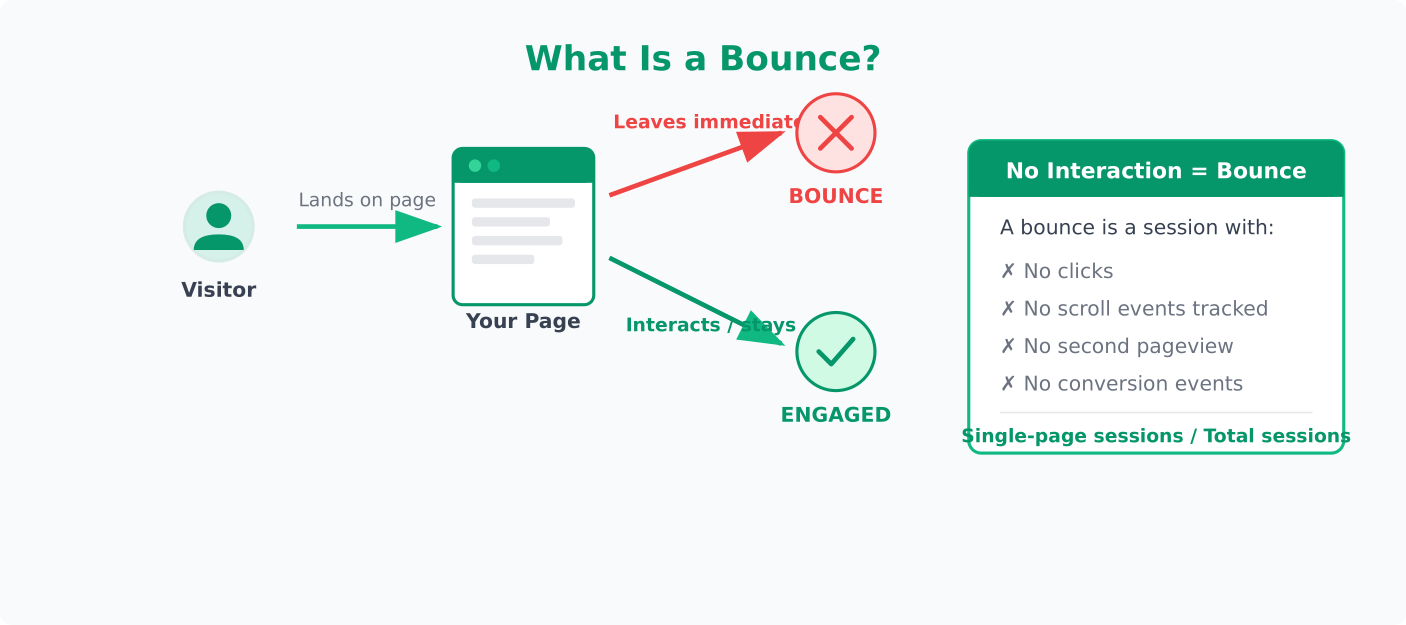
The formula is simple: Bounce Rate = Single-page sessions / Total sessions. But simple doesn’t mean useful. A high bounce rate on a landing page with a form might signal trouble. A high bounce rate on a support article might mean you’re doing your job well.
What Is Engagement Rate?
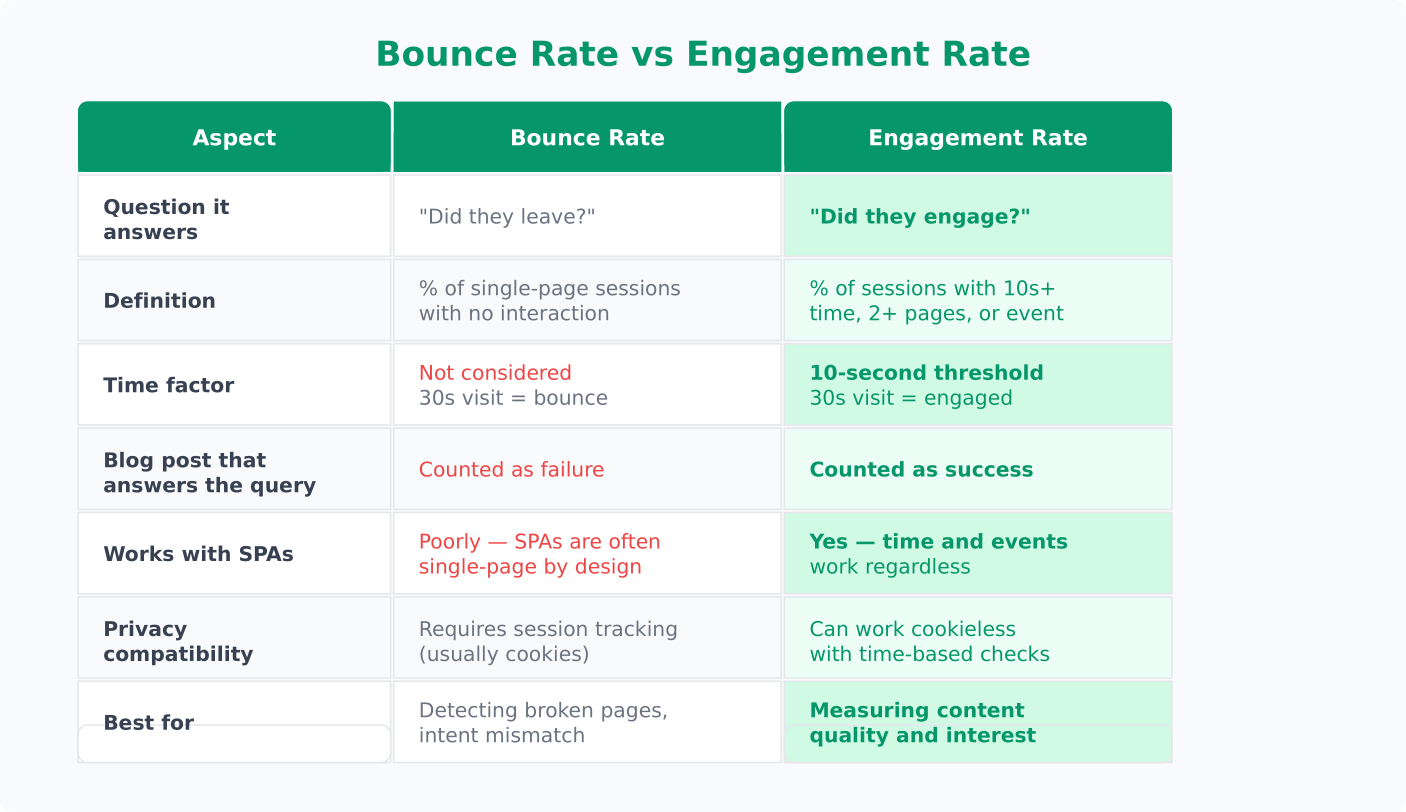
Engagement rate flips the question. Instead of asking “did they leave?”, it asks “did they engage?” An engaged session typically meets at least one of these criteria:
- The visitor stayed on the page for more than 10 seconds
- They triggered a conversion event
- They viewed more than one page
Engagement rate is the percentage of sessions that meet any of those thresholds. It’s the inverse of bounce rate, but with a meaningful time component added. That time component is what makes the difference.
A visitor who reads your article for three minutes and leaves? Under the bounce rate model, that’s a failure. Under the engagement rate model, that’s a success. The second interpretation is closer to reality.
What I’ve seen work best is treating engagement rate as a starting point, not a verdict. A 60% engagement rate tells you most visitors found something worth their time — but it doesn’t tell you what they found or whether it led to a business outcome. You still need conversion tracking for that.
Why the Shift Happened
The move from bounce rate to engagement rate didn’t happen overnight. It’s the result of three overlapping trends.
First, the web changed. When bounce rate was conceived, websites were collections of linked pages. Navigation meant clicking to a new URL. Today, single-page applications, infinite scroll, and embedded media mean a visitor can have a rich experience without ever triggering a second pageview. Bounce rate wasn’t built for this reality.
Second, measurement got smarter. Early analytics tools could only reliably track pageviews. Counting whether a visitor loaded one page or two was a reasonable proxy for engagement. Modern tools can track time on page, scroll depth, and interaction events — giving us much better signals of actual engagement.
Third, privacy regulations forced a rethink. With cookie consent requirements and shorter data retention windows, session-based metrics became less reliable. Engagement rate, which can be calculated from a single page interaction with a time threshold, works better in a privacy-constrained environment. You don’t need a persistent cookie to know someone spent 45 seconds reading your page.
The industry recognized that bounce rate was answering the wrong question. “Did they leave?” matters less than “did they get value?” Engagement rate is a better proxy for the second question.
Which Metric Should You Use?
The honest answer: it depends on what you’re measuring and what tools you have.
If your analytics platform still reports bounce rate, don’t ignore it — but add context. A bounce rate of 70% on a blog post is normal. A bounce rate of 70% on a product page with an add-to-cart button is a problem. The number alone tells you very little.
If you have access to engagement rate, use it as your primary indicator of content quality. It accounts for time spent, which bounce rate ignores. But don’t treat a high engagement rate as proof that everything is working — you still need to track whether engaged visitors take the actions that matter to your business.
In my experience working with small teams, the best approach is to use both metrics together when available:
- Engagement rate tells you whether visitors find your content worth their time
- Bounce rate (when properly segmented) flags pages where visitors leave immediately — a signal of mismatched intent or technical issues
- Conversion events tell you whether engagement translates to business results
The mistake I see most often is treating any single metric as a score. Your traffic metrics only make sense in context — what page, what source, what visitor intent.
How Privacy-First Tools Handle This
Privacy-first analytics platforms have taken different approaches to this problem, and some have leapfrogged the traditional tools.
Plausible reports bounce rate as the percentage of sessions with only one pageview. It’s the classic definition, kept simple. Plausible doesn’t track time on page by default (since it doesn’t use cookies), but its bounce rate is clean and easy to understand. For content sites, you can pair it with custom events to get a fuller picture.
Umami takes a similar approach. It tracks pageviews and sessions without cookies, reporting bounce rate as single-page visits. Umami’s event tracking lets you define your own engagement signals — button clicks, scroll milestones, form interactions — so you can build a custom engagement metric that fits your site.
Matomo offers both bounce rate and an “interactions” metric. Because Matomo can be self-hosted with full data control, it can track time on page and interaction depth more aggressively while still respecting privacy. It gives you the most flexibility, but also requires the most configuration.
The thing most guides don’t tell you: privacy-first tools often give you cleaner engagement data than traditional analytics. Without cross-site tracking and complex session stitching, you get a more honest picture of what’s happening on your specific pages. The numbers might be lower, but they’re more trustworthy.
Practical Takeaways
Here’s what to actually do with all of this:
Stop using bounce rate as a KPI in isolation. It was never designed to be a quality score. If you report it, always segment by page type and traffic source. A landing page from paid ads and an organic blog post have completely different expectations.
Set up engagement signals that match your goals. Don’t rely on defaults. Define what “engaged” means for your site — maybe it’s 30 seconds on page, maybe it’s scrolling past the fold, maybe it’s clicking a specific element. Most privacy-first tools let you track custom events without cookies.
Compare trends, not snapshots. Whether you’re using bounce rate or engagement rate, the absolute number matters less than how it changes over time. A bounce rate dropping from 75% to 65% after you restructure a page tells you something useful. A bounce rate of 65% on its own doesn’t.
Match the metric to the page purpose. Blog posts, product pages, landing pages, and documentation all have different engagement patterns. Build separate benchmarks for each.
Pick a tool that aligns with your values. If privacy matters to you and your visitors, choose a platform that measures engagement without invasive tracking. The data will be slightly different from what you’re used to, but it will be data you can trust — and data your visitors consented to share.
The shift from bounce rate to engagement rate isn’t just a relabeling. It represents a better understanding of how people actually use the web. Whether your analytics tool has caught up yet or not, you can start thinking in terms of engagement today.
Jonathan Whitaker
Marketing analyst and CXL-certified optimizer with 6+ years of experience in web analytics, conversion optimization, and privacy-first data strategy. Former analytics lead for e-commerce and SaaS companies across North America, now focused on helping businesses make better decisions with less data. Specializes in Plausible, Umami, Matomo, and cookieless analytics. Based in Vancouver, BC.