What Is a Pageview? (And Why It’s a Misleading Metric)
 Jonathan Whitaker
·
·
6 min read
Jonathan Whitaker
·
·
6 min read

Most marketers can tell you how many pageviews their site got last month. Fewer can tell you what that number actually means — or whether it matters.
A pageview is one of the oldest metrics in web analytics, and it’s still one of the most misunderstood. It sounds simple, but the way it’s counted creates blind spots that can lead you to bad decisions. Let me break down what a pageview really is, where it falls short, and what you should track instead.
What Is a Pageview?
A pageview is recorded every time a browser loads (or reloads) a page on your website. That’s it. One page load equals one pageview.
If someone visits your homepage, clicks to your pricing page, then goes back to the homepage, that’s three pageviews — even though they only saw two unique pages. The browser’s performance API fires on every navigation event, and your analytics tool records each one.
This is worth understanding because pageviews are the foundation that other metrics build on. Website traffic metrics like bounce rate, pages per session, and average time on page all depend on how pageviews are counted. If the foundation is shaky, everything built on it is too.
How Pageviews Are Counted
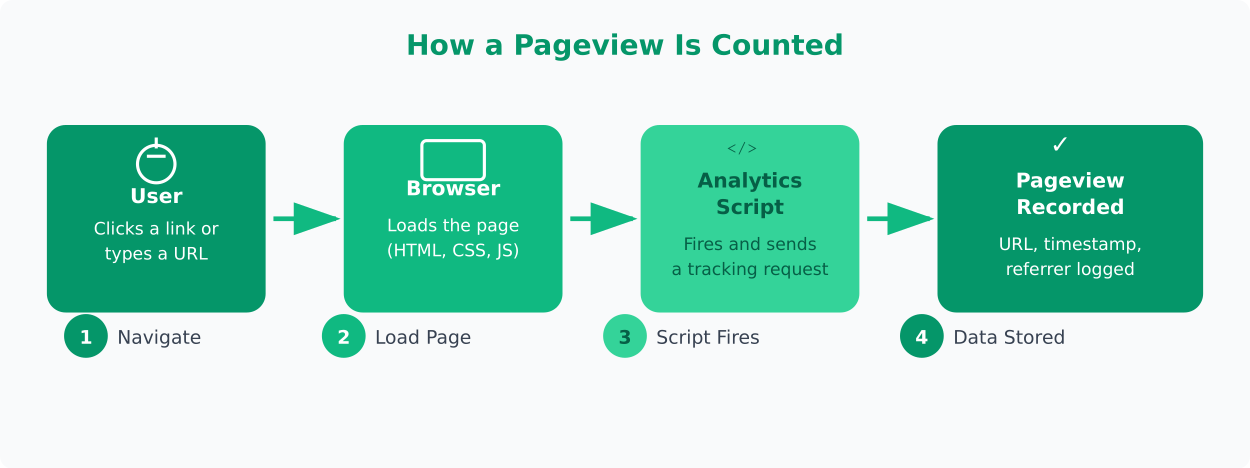
The mechanics are straightforward. Here’s what happens every time someone loads a page:
- User clicks a link or types a URL. The browser sends a request to your server.
- The server returns the page. HTML, CSS, JavaScript — all the assets load in the browser.
- The analytics script fires. A small piece of JavaScript on the page sends a request to your analytics provider (Plausible, Umami, Matomo, or whoever you use).
- The provider records the pageview. It logs the page URL, timestamp, referrer, and basic visitor info.
Simple enough. But here’s where it gets tricky.
Every reload counts as a new pageview. Someone refreshing the page five times creates five pageviews from a single person on a single page. Browser back-and-forward navigation can also trigger new pageviews depending on your setup. And with single-page applications (SPAs), the default pageview tracking often breaks entirely because the page never technically “reloads.”
Privacy-first tools like Plausible and Umami handle this more cleanly than traditional analytics. They use lightweight scripts that still capture pageviews but avoid cookies and fingerprinting. Plausible’s metric definitions make it clear exactly what counts as a pageview, which I appreciate.
Why Pageviews Are Misleading
In my experience working with small teams, pageviews are the metric that causes the most false confidence. Here’s why.
High pageviews don’t mean high engagement. A blog post with 10,000 pageviews sounds impressive. But if 80% of those visitors left within five seconds, you didn’t have 10,000 readers. You had 10,000 page loads. There’s a meaningful difference.
Pageviews don’t tell you about people. Ten pageviews could mean ten different visitors, or one person refreshing a page ten times. Without combining pageviews with unique visitor data, the number is hollow. This is why understanding customer segments matters — raw pageviews flatten everyone into the same bucket.
Bots inflate your counts. Depending on your analytics setup, automated crawlers, scrapers, and monitoring tools can register as pageviews. Most privacy-first tools filter these out better than you’d expect, but it’s never perfect.
Content structure skews the numbers. A site that splits articles across five pages (pagination) will naturally generate more pageviews per visit than one that puts everything on a single page. The five-page version looks more “engaging” by pageview count, but the reader experience might actually be worse.
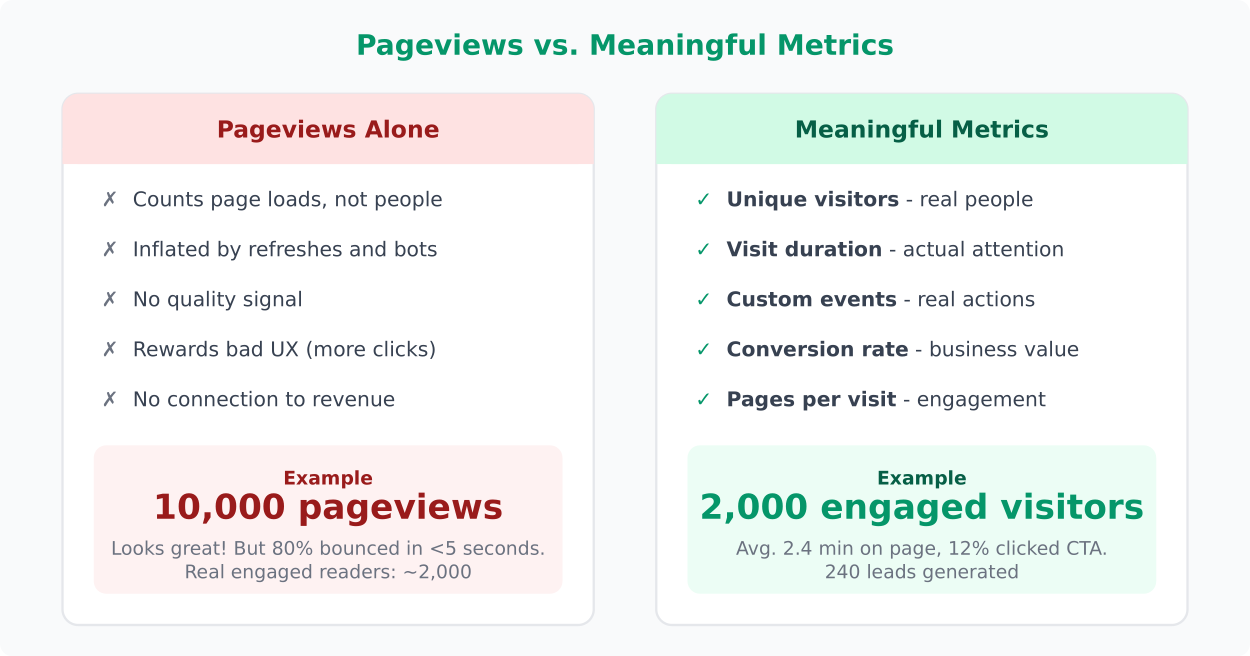
The thing most guides don’t tell you: pageviews reward bad design. Pop-ups that redirect users, confusing navigation that forces extra clicks, broken links that lead to error pages — all of these increase pageview counts while making your site worse.
What to Track Instead
I’m not saying to ignore pageviews entirely. But they should never be your primary success metric. What I’ve seen work best is combining pageviews with metrics that measure actual value.
Unique visitors. How many distinct people came to your site? This gives you a real count of your audience size. Both Plausible and Umami display this prominently, which tells you something about what matters.
Visit duration (or engagement time). How long did people actually spend on your content? A pageview with 45 seconds of reading is fundamentally different from one with a 3-second bounce. Core Web Vitals can also help you understand whether slow load times are cutting visits short.
Custom events. Track the actions that actually matter to your business. Someone clicking “Start free trial” is worth more than a thousand pageviews. In Matomo, Plausible, and Umami, setting up custom event tracking is straightforward and gives you data tied to real outcomes.
Conversion rate. What percentage of visitors take the action you want? This normalizes for traffic volume and tells you whether your pages are effective, not just visited.
Pages per visit. This is more useful than raw pageviews because it’s relative. If visitors typically view 3.5 pages per session, and that drops to 1.2 after a redesign, you know something broke. Raw pageview counts might still look fine if traffic increased.
Here’s a practical framework I use with clients:
- Awareness: Unique visitors, traffic sources
- Engagement: Visit duration, pages per visit, scroll depth
- Action: Custom events, goal completions, conversion rate
- Retention: Returning visitors, visit frequency
Pageviews fit into the “awareness” layer, but they’re the weakest signal there. Unique visitors tells you more.
When Pageviews Still Matter
I’ve made this mistake myself — dismissing pageviews too aggressively. There are legitimate cases where they’re the right metric.
Ad-supported sites. If your revenue model depends on display advertising, pageviews directly correlate with ad impressions and revenue. More pageviews literally means more money. In this context, pageviews are a business metric, not just a vanity metric.
Server capacity planning. Pageviews map roughly to server requests. If you need to plan for infrastructure scaling, pageview trends help you forecast load. This is an operational use case, not an engagement one.
Content volume benchmarking. When comparing months or quarters, total pageviews can show directional trends in overall site activity. The key word is “directional” — use it for spotting trends, not making precise conclusions.
Identifying popular content. Sorting pages by pageview count is a quick way to find what’s getting attention. It won’t tell you if that attention is positive, but it narrows down where to look. Pair it with engagement metrics and you have a useful content audit workflow.
The bottom line: pageviews are a counting metric, not a quality metric. They tell you something happened but not whether it mattered. Use them as a starting point, combine them with metrics that reflect real behavior, and don’t let a big pageview number convince you everything is working.
Good analytics is about asking better questions, not collecting bigger numbers. Let the data steep.
Jonathan Whitaker
Marketing analyst and CXL-certified optimizer with 6+ years of experience in web analytics, conversion optimization, and privacy-first data strategy. Former analytics lead for e-commerce and SaaS companies across North America, now focused on helping businesses make better decisions with less data. Specializes in Plausible, Umami, Matomo, and cookieless analytics. Based in Vancouver, BC.