GDPR-Compliant Analytics: What You Actually Need to Do
 Jonathan Whitaker
·
·
9 min read
Jonathan Whitaker
·
·
9 min read

Most GDPR guides are written by lawyers. This one’s written by someone who’s actually had to implement compliant analytics across multiple sites — and dealt with the panic when a client gets a data subject access request they weren’t prepared for.
The regulation isn’t as complicated as most people make it sound. But the gap between “I’ve read about GDPR” and “my analytics setup is actually compliant” is wider than you’d think. I’ve helped three teams through this process, and the same mistakes come up every time.
Here’s what you actually need to do.
What GDPR Actually Requires for Analytics
Let’s strip away the legal jargon. For analytics purposes, GDPR comes down to a few core principles:
Lawfulness. You need a valid legal reason to process personal data. For analytics, that’s either consent or legitimate interest — and which one applies depends entirely on how your tools work.
Data minimisation. Only collect what you genuinely need. If you’re tracking individual user journeys but only reporting on aggregate traffic numbers, you’re collecting more than necessary. I wrote a full breakdown of how data minimisation works in practice if you want the details.
Transparency. People need to know what you’re collecting and why. This means a clear privacy policy — not a 4,000-word document nobody reads.
Storage limitation. Don’t keep data longer than you need it. If you’re sitting on three years of granular user data “just in case,” that’s a problem.
Accountability. You need to be able to demonstrate compliance, not just claim it. Documentation matters.
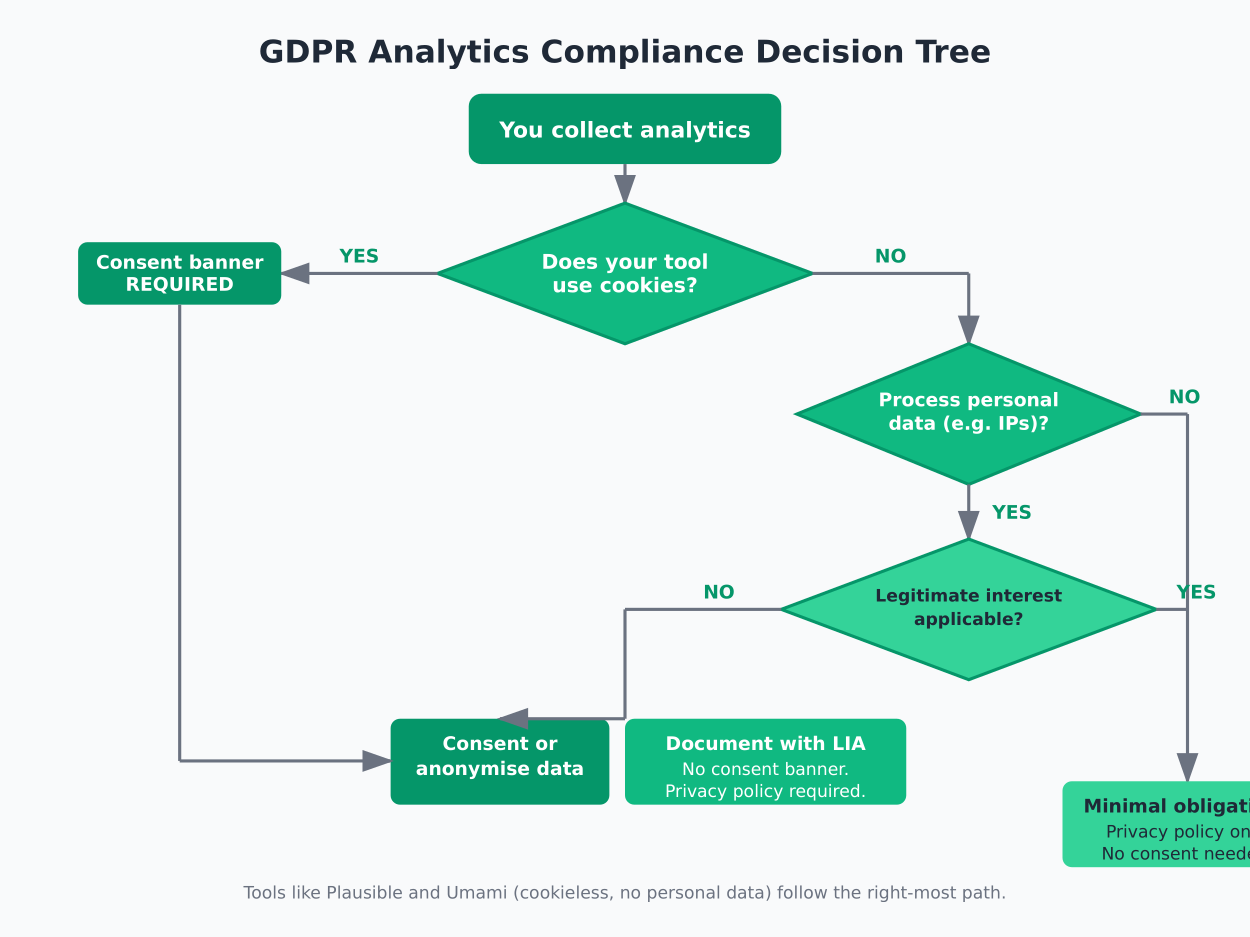
The thing most guides don’t tell you: whether you need cookie consent depends on your analytics tool, not on GDPR itself. GDPR regulates personal data processing. The ePrivacy Directive (often called the cookie law) is what governs cookies specifically. They overlap, but they’re separate regulations.
If your analytics tool doesn’t use cookies and doesn’t process personal data, you may not need a consent banner at all. That changes the entire compliance picture.
The Compliance Checklist
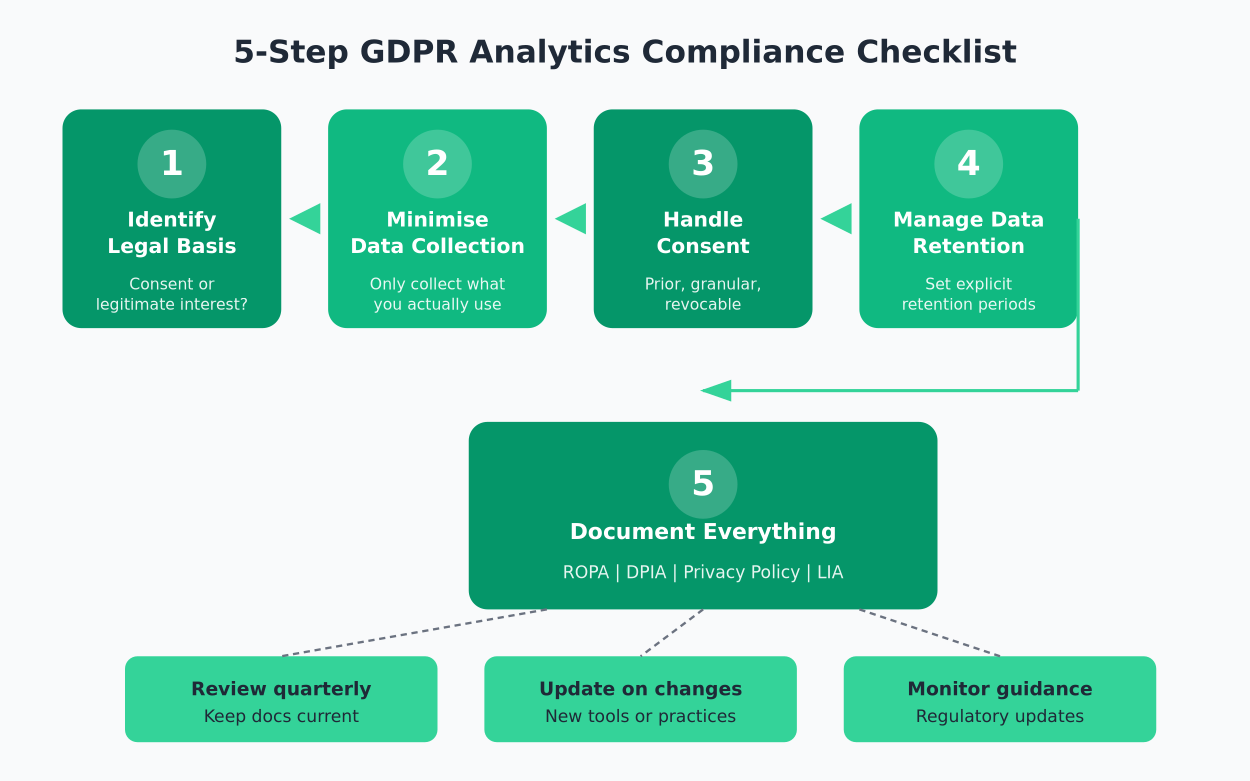
Here’s the practical checklist I use when auditing a site’s analytics setup. Work through these in order — each step builds on the previous one.
1. Identify Your Legal Basis
You have two realistic options for analytics:
Consent: The user explicitly agrees to tracking before it happens. Required if you use cookies, fingerprinting, or collect identifiable data. This is the safer choice when you’re unsure.
Legitimate interest: You argue that analytics serves a legitimate business purpose and doesn’t override the user’s rights. This can work for privacy-first tools that don’t use cookies or process personal data — but you need to document your reasoning with a Legitimate Interest Assessment (LIA).
The UK ICO’s guidance on legitimate interest is the clearest explanation I’ve found. Even if you’re not UK-based, it’s worth reading.
If you’re using cookie-based analytics, consent is your only option. There’s no way around it. And as I covered in my article on why cookie consent banners break your analytics, that consent requirement typically means losing 30-60% of your data.
2. Minimise Data Collection
Go through your analytics setup and ask: do I actually use this data point?
Most teams collect far more than they analyse. IP addresses, user agents, screen resolutions, referrer strings — some of these are useful, some are habit. Here’s a practical filter:
- Page views and referrers: Almost always necessary. Keep these.
- IP addresses: Rarely needed for analytics. Anonymise or don’t collect.
- Device and browser data: Useful for design decisions. Aggregate is fine — individual-level is usually excessive.
- User IDs or session tracking: Only if you genuinely need user journey analysis. Most sites don’t.
- Location data: Country-level is usually sufficient. City-level from IP geolocation is personal data in many interpretations.
The principle is straightforward: if you can’t explain why you collect a specific data point, stop collecting it.
3. Handle Consent Properly
If you need consent (because your tool uses cookies or processes personal data), here’s what “properly” means under GDPR:
Prior consent. No tracking scripts load before the user agrees. Pre-checked boxes don’t count. Cookie walls that force acceptance are questionable at best — the French CNIL has been clear about this.
Granular consent. Users should be able to accept analytics separately from marketing cookies. A single “accept all” button with no alternatives isn’t compliant.
Easy withdrawal. Revoking consent must be as easy as giving it. If your consent banner is prominent but the opt-out is buried in your privacy policy, that’s a problem.
Record keeping. You need to store proof that consent was given — when, how, and what was agreed to.
If your analytics tool doesn’t require consent, you still need to inform users about data processing in your privacy policy. Transparency isn’t optional regardless of your legal basis.
4. Manage Data Retention
Set explicit retention periods for your analytics data. “Indefinitely” is never the right answer.
Practical guidelines:
- Raw analytics data: 14-26 months is reasonable for most sites. This gives you year-over-year comparison ability.
- Aggregated reports: Can be kept longer since they don’t contain personal data.
- Consent records: Keep these for as long as you process data, plus a reasonable period after (typically the statute of limitations in your jurisdiction).
- Server logs: Often overlooked. These contain IP addresses and are personal data. 30-90 days is typical.
Check that your analytics tool actually deletes data when the retention period expires. Some tools archive it instead, which doesn’t satisfy GDPR requirements.
5. Document Everything
This is where most teams fall short. You need:
A Record of Processing Activities (ROPA). This documents what data you collect, why, how it’s processed, and who has access. It’s mandatory for most organisations under Article 30.
A Data Protection Impact Assessment (DPIA). Required when processing is likely to result in high risk to individuals. Large-scale analytics or profiling typically qualifies.
Your privacy policy. Updated to accurately reflect your current analytics setup. Not a template you copied two years ago.
A Legitimate Interest Assessment. If that’s your legal basis, document the balancing test you performed.
I keep all of this in a shared document that gets reviewed quarterly. It doesn’t need to be complicated — it needs to be accurate and current.
Tools That Make Compliance Easier
Your choice of analytics tool determines about 80% of your compliance burden. Here’s the practical breakdown:
Plausible Analytics. No cookies, no personal data collection, EU-hosted. Can operate under legitimate interest without consent banners. This is the lowest-friction option for GDPR compliance I’ve found. Open source, so you can verify the claims.
Umami. Self-hosted option, no cookies, privacy-focused. You control the data entirely, which simplifies data processor agreements. Requires more technical setup but gives you full control over data residency.
Matomo. Can be configured for cookieless tracking, self-hosted or cloud. More complex than Plausible but offers features closer to traditional analytics. The CNIL has specifically recognised Matomo’s cookieless configuration as exempt from consent requirements.
Fathom Analytics. No cookies, EU isolation available. Similar approach to Plausible with a slightly different feature set.
The common thread: tools that don’t use cookies and don’t process personal data dramatically reduce your compliance requirements. You still need a privacy policy and documentation, but you can skip the consent management platform entirely.
Common Mistakes to Avoid
After auditing multiple analytics setups, these are the mistakes I see repeatedly:
Assuming cookieless means no GDPR obligations. Even without cookies, if you process personal data (like IP addresses), GDPR applies. Cookieless tools that still fingerprint users aren’t automatically compliant.
Copying someone else’s privacy policy. Template privacy policies are a starting point, not a solution. Your policy needs to reflect your actual data practices. If it mentions tools you don’t use or omits ones you do, it’s not compliant.
Ignoring data processor agreements. If you use a third-party analytics tool, you need a Data Processing Agreement (DPA) with that provider. Most privacy-focused tools provide these — but you actually need to sign them.
Forgetting about server logs. Your web server likely logs IP addresses, user agents, and request URLs by default. These are personal data under GDPR. Set retention periods and document them.
Treating compliance as a one-time project. GDPR compliance is ongoing. Tools change, regulations get clarified, your data practices evolve. Build a review cadence — quarterly works for most teams.
Over-collecting “just in case.” The instinct to capture everything because you might need it later directly conflicts with data minimisation. Collect what you need now. You can always add data points later if a genuine need arises.
A Realistic Timeline
If you’re starting from scratch, here’s a realistic timeline for getting your analytics setup GDPR-compliant:
Week 1: Audit and decide. Review your current analytics setup. List every data point you collect. Choose your legal basis. If you’re switching tools, pick one.
Week 2: Implement. Set up your chosen analytics tool. Configure data retention. If consent is required, implement a consent management platform. Remove any tracking that loads before consent.
Week 3: Document. Write or update your privacy policy. Complete your ROPA. Draft your DPIA if required. If using legitimate interest, complete your LIA.
Week 4: Review and test. Have someone else review your setup. Test the consent flow if applicable. Verify that data retention settings work. Check that your privacy policy matches reality.
Ongoing: Maintain. Review quarterly. Update documentation when anything changes. Monitor regulatory guidance from your supervisory authority.
Four weeks is realistic for a straightforward site. More complex setups with multiple properties, team access controls, and cross-border considerations will take longer. But the core process is the same.
The bottom line: GDPR compliance for analytics isn’t about checking boxes. It’s about making deliberate choices about what data you collect and being transparent about those choices. Pick the right tools and it becomes dramatically simpler.
Jonathan Whitaker
Marketing analyst and CXL-certified optimizer with 6+ years of experience in web analytics, conversion optimization, and privacy-first data strategy. Former analytics lead for e-commerce and SaaS companies across North America, now focused on helping businesses make better decisions with less data. Specializes in Plausible, Umami, Matomo, and cookieless analytics. Based in Vancouver, BC.